
Have you ever struggled organizing your thoughts when starting a new project? You know exactly what you need to do to get to the finish line, though your mind is all over the place – either due to a deadline or because you can’t decide what design application or technology to use. Balsamiq, the Adobe Suite, and Sketch are all applications I use for design and at different stages of a project. So how do you keep track of all these files?

I use a simple approach right from the beginning. I use a folder structure template that serves as a collection of design and code assets.
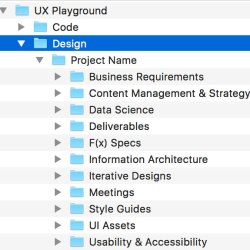
My “UX Playground” folder contains 2 main subfolders: “Design” and “Code”. I separate these 2 because there is little overlap (with the exception of images/sprites, but even those are generated/compiled differently. More on that in another post). I tweaked my folder structure recently by adding “saas” under the “Code” folder and “Sketch” under the Design/UI Assets folder.
Design –
- I focus on filling the “Business Requirements” and “Usability & Accessibility” folders first. During this phase, I work closely with business owners and stakeholders to understand what the needs are (i.e. meeting with SMEs and research competitors). From these conversations, I collect data and continue to do research (i.e. create personas, write case studies, and begin sketching ideas). “Content Management & Strategy” can come into play early on if lots of content already exists, though this usually starts later, alongside the iterative design phase. Of course, there will be ongoing administrative tasks that need to be captured and reports that will be analyzed throughout the project; these are categorized under “Meetings” and “Data Science“, respectively.
- I take this collection of information and work on the “Information Architecture” and “F(x) Specs”, simultaneously. It’s tempting to put off the functional specs to the very end, though I find it easier if I start early on – capture your thoughts as you design. You are less likely to miss something and risk having developers ask you to explain your thoughts and/or misunderstand the UI. Avoid leaving information out – the last thing you want is to confuse them or have them waste time on development; this will only extend the time to code and delay your target deadline. If a deadline is tight, I will write a lightweight functional spec that gets integrated with a storyboard to lay the ground work of what the vision of the project is heading. Often times, people are more focused on completing deliverables rather than focus on producing a great design experience. By telling the story of the users, it helps remind the stakeholders what we are trying to solve and why we are designing the product. There are many ways to define these types of workflows – the key is to make sure this sets the structure of your design and it stays consistent.
- If a product is new, a style guide will need to be created. If a new product is part of a larger suite of applications, then use the existing style guide and existing UI assets. The bulk of the work a designer focuses on is building a library of UI assets (i.e. vector artwork, SVGs, mobile vs. Web visual cues). Usually these designs evolve from the prototyping phase, though setting these up before you jump into a complete UI will serve you better. Create reusable libraries because it will help make your design process faster. Most applications will allow you to build one – I use them frequently in InDesign and recently in Sketch.
- Now the fun begins – iterative designs. If you are part of a lean #UX process, you will be prototyping and modifying the product frequently. Because this process tends to go at a rapid pace, it would be wise to keep track of all your work. It’s very common that some of your earlier designs may be desired at some later point in time. I store all the versions under the “Iterative Designs“, and most often than not (depending on your organization), a source control application isn’t used to keep version control of these large design files.
- Once you have completed the product designs, I drop them in my “Deliverables” folder, along with any documentation and UI assets that are required to begin coding. I normally name them according to a milestone so I can be reminded of the product’s progress. It’s always fun to see how a product has evolved over time.
Summary: When juggling multiple design projects, take advantage of reusable assets. Invest time to build and/or consolidate your resources. You will benefit in the long run and be prepared for new products in the pipeline. The end goal is to provide precise designs and documentation that detail the intended interactions and behaviours for developers to code. In my next post, I will talk about how I approach organizing my “Code” folder.
 CHOhesive